Smart Heater Scheduling: Optimize Comfort & Save Energy
On this page 5 sections
You come home from work on a chilly evening, expecting a warm house. Instead, you walk into a room that feels like a refrigerator. The thermostat says it’s set to 68°F, but the furnace has been running hard all day because you forgot to adjust the schedule. Sound familiar? Most people waste between 10 and 30 percent of their heating bill simply because their heater runs when nobody is home or when everyone is asleep.
Smart heater scheduling changes that. Instead of manually twisting a dial or hoping your memory holds up, you set a simple routine that matches your real life. This article walks you through exactly how to build a schedule that keeps you comfortable and cuts your energy bill. I’ll cover the numbers, the practical settings, and the gear that makes it all work—no fluff, no hype.
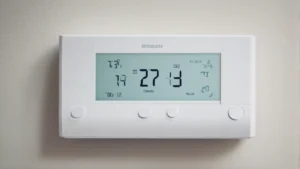
One straightforward way to start is with a smart thermostat that does most of the heavy lifting. The Amazon Smart Thermostat works with Alexa and Ring, requires a C-wire, and meets ENERGY STAR certification standards. According to EPA estimates, that certification alone saves an average of $90 per year on energy bills. After purchase, Amazon emails you details about rebates from local energy providers, which can knock the upfront cost down further. It’s a clean, affordable entry point into smart scheduling.
Why a Fixed Schedule Beats Manual Tweaks

Manual thermostat adjustments are unreliable. You forget. You guess. You overcompensate. A fixed schedule removes all that guesswork. But there’s a common mistake: people set one temperature for the whole day and never change it. That’s not scheduling—that’s just setting a target. Real scheduling means having different temperature targets for different times.
The U.S. Department of Energy recommends turning your thermostat back 7–10°F for eight hours a day. Do that, and you can save about 10 percent annually on heating. If your heating bill runs $1,200 a year, that’s $120 in your pocket. The trick is finding the right periods to drop the temperature without freezing yourself out.
Here’s a baseline schedule that works for most households:
- 6:00 AM – 8:00 AM (Wake-up): 68°F. Warm enough to get out of bed and shower without shivering.
- 8:00 AM – 5:00 PM (Away): 60°F. Nobody is home. Pipes won’t freeze, and the furnace barely runs.
- 5:00 PM – 10:00 PM (Home): 68°F. Comfortable for cooking, watching TV, relaxing.
- 10:00 PM – 6:00 AM (Sleep): 62°F. Cooler rooms help you sleep better and save energy.
This pattern saves around 15–20 percent compared to holding 68°F all day. You don’t feel the temperature change because the house cools down gradually while you’re away and warms up just before you return.
Real Factors That Affect Your Ideal Schedule
No two homes behave the same way. Your schedule should adapt to your house’s thermal characteristics, not the other way around. Three big variables matter.
1. Your home’s insulation and heat loss rate
A well-insulated house loses heat slowly. You can set a deeper setback (say, 55°F while away) and still recover to 68°F in 20 minutes. A drafty old house might need only a 5°F setback, because dropping further means the furnace runs for an hour to climb back up, which eats into the savings. You can test your recovery time: set the thermostat back 5°F, wait one hour, then set it back to normal. How long does it take to climb back? That’s your window.
2. Occupancy patterns that aren’t the same every day
If you work from home Wednesdays, your schedule needs to account for that. Many smart thermostats let you set different schedules for different days. The Amazon Smart Thermostat, for instance, lets you create home, away, and sleep schedules that you can customize per day. If you have irregular hours, consider using presence detection—Alexa-enabled devices can sense when you’re home and adjust accordingly.
3. Sleeping temperature preferences
Most people sleep better in cooler rooms—between 60 and 67°F. But if your partner runs cold, you might need a compromise. I’ve found that 64°F works for most couples, especially with a good duvet. For kids’ rooms, keep it warmer (66–68°F) because their bodies regulate temperature differently. Your schedule can have different zones if your thermostat supports multi-zone control (the Amazon Smart Thermostat works best with a single zone unless paired with additional sensors).
How to Program Your Smart Thermostat Like a Pro
Most people buy a smart thermostat, plug it in, and never touch the scheduling feature. That’s a waste. Here’s a step-by-step approach that takes about 15 minutes.
- Map your week. Write down your typical awake times, work times, and sleep times for each day. Include weekends. Mark any days you’re regularly out of the house.
- Set your comfort temperature. What temperature feels good when you’re home and awake? Most people pick 68–70°F. Write that number down.
- Choose your setback temperature. How cold are you comfortable letting it get when you’re away or asleep? 60°F is a safe minimum—pipes won’t freeze and recovery is fast. If you have pets, check smart controlled heater adjustments for pets for guidance on pet-safe minimum temperatures.
- Set recovery time. If you want it to be 68°F at 6:00 PM when you walk in, the thermostat needs to start heating earlier. How much earlier depends on your house’s recovery time. Start with 30 minutes and adjust if needed. The Amazon Smart Thermostat’s auto-scheduling feature can learn this over time if you let it.
- Test and tweak. Run your schedule for three days. If you wake up cold, nudge the sleep temperature up 1°F. If you come home to a house that’s still chilly, start the recovery period 15 minutes earlier.
One honest caveat: the recovery learning on some entry-level thermostats can be slow. It took my Amazon Smart Thermostat about a week to dial in the right preheat time. That’s normal. Don’t fight it—just let it learn.
| Strategy | Typical Savings | Best For | Complexity |
|---|---|---|---|
| Fixed temperature all day | 0–5% | People who are home most of the day | Low |
| Manual setback when leaving | 5–10% | Homes with irregular schedules | Medium |
| Programmed daily schedule (4 periods) | 10–20% | Standard 9-to-5 households | Low-Medium |
| Adaptive/learning schedule | 15–25% | Tech-savvy users, varying routines | Medium |
| Zone-based scheduling (multiple thermostats) | 20–30% | Larger homes with unused rooms | High |
Note: Adaptive learning means the thermostat adjusts based on your habits and weather forecasts. The Amazon Smart Thermostat doesn’t have full self-learning like some premium models, but its Alexa+ advanced features let you set routines that respond to presence and voice commands, which is close enough for most people.
Frequently Asked Questions About Smart Heater Scheduling
Does turning the heat down and up again use more energy than leaving it constant?
No. That’s one of the most persistent myths in home heating. Heat loss through walls and windows depends on the temperature difference between inside and outside. When you lower the thermostat, the house cools down, so the temperature difference shrinks, and heat loss slows. The furnace doesn’t have to work as hard to maintain a lower temperature. The recovery period does require a burst of energy, but it’s smaller than the energy saved during the setback. For most homes, a setback of 7–10°F for eight hours saves real money. If you have a heat pump, check the manufacturer’s recommendations—some heat pumps prefer a smaller setback to avoid running auxiliary electric resistance heat.
How low can I set my thermostat when I’m away without risking frozen pipes?
Keep it at 55°F or higher. Pipes typically freeze when the temperature around them drops below 32°F, but inside walls can be colder than the room air. A 55°F room temperature gives a safety margin of about 23 degrees. If you live in a very cold climate (sustained outdoor temps below 0°F) or have pipes in uninsulated exterior walls, consider keeping the setback to 60°F. Also, open cabinet doors under sinks to let warm air circulate. For more on this, read our guide on how to set your heater to save energy without risking frozen pipes.
Will a smart thermostat really save me $90 a year like the EPA says?
The EPA’s $90 figure is an average across all ENERGY STAR certified thermostats, assuming proper use. Your actual savings depend on your climate, your previous thermostat habits, and how much you program the schedule. If you previously left the heat at 70°F all day, you’ll save more than $90. If you already used a manual setback occasionally, savings will be smaller. The Amazon Smart Thermostat is ENERGY STAR certified, so it qualifies for that average. But don’t expect the thermostat alone to save money—you have to use the scheduling feature. It’s a tool, not a miracle.
Do I need a C-wire for a smart thermostat?
Most smart thermostats, including the Amazon Smart Thermostat, require a C-wire (common wire). The C-wire provides continuous power to the thermostat, allowing it to run its display, Wi-Fi, and processor. If your current thermostat doesn’t have a C-wire, you have options: check if your furnace has an unused C terminal and run a new wire, use an adapter (most brands sell one), or hire an electrician. Skipping the C-wire can lead to power cycling or random Wi-Fi disconnects—I’ve seen it happen. It’s worth the extra effort to get it wired correctly.
Can I use smart heater scheduling with a space heater or portable heater?
Yes, but with limits. Most space heaters have basic timers that let you set on/off periods, but they don’t learn your schedule or adjust based on temperature. You can pair a smart plug with a basic space heater to create schedules, but the heater must have a mechanical on/off switch (not electronic) for the smart plug to work. However, this won’t give you temperature-based control—just time-based. For more comprehensive control, consider a smart control system for your heater that integrates temperature sensing and scheduling.
Things You Can Do Right Now
- Program a four-period schedule (wake/away/home/sleep) today—it takes under 15 minutes and will save you money starting tomorrow.
- Set your away temperature to 60°F if you leave for more than four hours. That’s safe for pets, pipes, and plants.
- Use a smart thermostat’s built-in presence detection (like Alexa’s away mode) to automatically override your schedule when nobody is home.
- Test your home’s recovery time once: drop the temperature 5°F, wait an hour, then measure how long it takes to climb back up. Use that number to set your preheat timing.
- If you have rooms you rarely use, close the vents and doors—but don’t close more than 20% of your vents, or you risk back-pressure issues in your HVAC system.
- Check with your local utility or energy provider for rebates on smart thermostats. The Amazon Smart Thermostat purchase triggers an email with rebate info, but you can also visit your provider’s website directly.
- Give your thermostat a week to learn your habits before tweaking it. Patience pays off better than micromanaging.