Smart Control Integration for Your Heating System: A Complete Guide
On this page 6 sections
You walk into your house on a freezing winter evening. It’s cold inside because the heat has been off all day. You crank up the thermostat and wait twenty minutes for the chill to fade. That wasted energy during the day—and the discomfort when you get home—is a problem most homeowners live with. Smart control integration fixes that.
This guide walks you through what you actually need to know about connecting your heating system to a smart controller. Not the marketing fluff. Real details: which components matter, how to choose between approaches, what to expect during setup, and how to get the most out of your system once it’s running. By the end you’ll know exactly what to buy and how to set it up for your home.
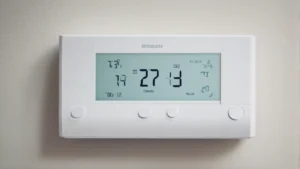
A product like the Check price on Amazon simplifies the process. It’s a Wi‑Fi thermostat with a color touchscreen and a free app for remote control. The built‑in scheduling and energy‑tracking features help you save without thinking about it, and it works with most systems—check compatibility on their website before buying.
What Smart Control Integration Actually Means

Smart control integration goes beyond swapping an old thermostat for a new one. It’s about connecting your heating equipment to a network so you can adjust settings remotely, automate based on time or conditions, and track usage patterns.
The core pieces are a smart thermostat (or controller), your home Wi‑Fi, a mobile app, and often additional sensors. The thermostat talks to the cloud through your router, and you talk to the cloud through your phone. That’s the basic loop.
But real integration means the system learns your habits. The ecobee, for example, adapts to your schedule—it lowers temperature when you’re away and brings it back before you return. According to ecobee’s own testing, that can save up to 23% annually compared to leaving the thermostat set at a constant 72°F. The exact savings depend on your home’s insulation, climate, and how well you set the schedule.
Not every system supports full integration. The ecobee claims compatibility with about 85% of residential heating and cooling systems. The remaining 15% includes older millivolt systems, high‑voltage line‑voltage units, and some proprietary setups. Always run the compatibility check before buying.
Choosing Your Integration Method
There are three main ways to add smart control to a heating system. Each has trade‑offs in cost, complexity, and capability.
| Integration Method | Setup Complexity | Remote Access | Best For |
|---|---|---|---|
| Direct Wi‑Fi thermostat (e.g., ecobee) | Moderate – need C‑wire or Power Extender Kit | Full app control | Standard forced‑air or heat pump systems |
| Hub‑based system (e.g., SmartThings + zwave thermostat) | Higher – requires separate hub and pairing | Through hub | Homes already using a smart home hub |
| Dedicated controller (e.g., for hydronic/radiant) | Variable – often professional install | Depends on model | Radiant floors, boilers, zone‑controlled setups |
For most homeowners, a direct Wi‑Fi thermostat like the ecobee is the simplest route. It replaces your existing thermostat and connects straight to your router. No extra hub needed. The ecobee comes with a Power Extender Kit for houses without a common wire (C‑wire), which solves the most common compatibility headache.
Hub‑based systems offer more flexibility if you’re already using a smart home platform. You can add motion sensors, door sensors, and weather data to tweak the heating logic. But setup takes longer, and not all thermostats work with every hub.
Hydronic or radiant systems often need zone‑specific controllers. Those aren’t always sold as consumer DIY products—you might need a contractor. But once installed, they offer precise room‑by‑room control.
Practical Setup Steps That Matter
Getting smart control integration right requires attention to a handful of details that people often skip.
- Check compatibility early. Use the online checker on the manufacturer’s support page. If your system isn’t listed, call them before ordering. Save the return hassle.
- Deal with the C‑wire issue. Many older thermostats don’t have a common wire, which provides constant power to the thermostat. Without it, Wi‑Fi thermostats may struggle or lose connection. The ecobee’s Power Extender Kit solves this—you install it at the furnace, not behind the thermostat. It uses existing wires to send power.
- Place the thermostat correctly. In a hallway near the center of the house, away from drafts, direct sunlight, and heat sources like lamps or kitchen appliances. A bad location means the system runs too often or not enough.
- Set up the app and schedule. Most smart thermostats default to a generic schedule. Spend 15 minutes adjusting it to your actual wake, leave, return, and sleep times. This alone cuts wasted heating.
You can control your heater remotely once the app is paired. If you leave work early, bump the temperature up from your phone so the house is warm when you walk in. But remember: remote control only works if your Wi‑Fi stays up. A power outage or router reset can break the link.
For advanced users, customize comfort settings like temperature thresholds, fan schedules, and humidity targets. The ecobee lets you set separate comfort profiles for Home, Away, and Sleep. You can also enable Smart Home & Away—the thermostat learns if someone is present based on occupancy sensors and adjusts automatically.
 Heating System Upgrade PlannerChoose between a heat pump, a furnace, a boiler or a hybrid with your own numbers, and hire the right installer.Every system compared side by side25 questions for contractors, red flagsRunning-cost, payback and quote calculator (Excel)
Going Beyond the Basics: Automation and Learning
Once your thermostat is on the network, the real power comes from automation. You can link it to other smart devices for smarter behavior.
For example, connect a door sensor. When the sensor detects the door opened while you’re away, the thermostat can drop to an eco temperature because it knows no one is inside yet. Or link to a weather service—if the forecast shows a sudden warm front, the system pre‑heats less aggressively.
The ecobee includes built‑in occupancy detection. It tracks movement in the room. If you’re home but not in the main living area, it still maintains base comfort settings but won’t blast heat unnecessarily. Over a week or two, the thermostat learns your patterns and adjusts proactively.
You can also integrate additional devices like remote sensors. Placing one in a cold bedroom lets the system balance temperatures across zones—that room gets priority when needed. This prevents overcooking the rest of the house to fix a single chilly spot.
One limitation: learning algorithms aren’t perfect. The ecobee took about a week to settle into my schedule. During that time I had to manually override a few settings. After that, it mostly got it right. Don’t expect magic on day one.
Frequently Asked Questions
Do I need a C‑wire for a smart thermostat?
Not necessarily. Many smart thermostats, including the ecobee, include a Power Extender Kit that works without a C‑wire. You install the kit at your furnace, and it uses the existing wires to deliver power. If your system is compatible, you’re set. Check the manufacturer’s instructions—some very old systems may not support the kit.
Can I control my heater remotely without a smart thermostat?
Sort of. You can install a Wi‑Fi relay or smart switch that controls a line‑voltage heater. But for central forced‑air or heat pump systems, a smart thermostat is the only practical way. A relay doesn’t give you scheduling, temperature sensing, or zone control.
Will smart control integration work with my old boiler?
It depends on the boiler’s control voltage. Most residential boilers use 24‑volt thermostats, which work with standard smart thermostats. If your boiler uses line‑voltage (120V or 240V) controls, you need a specific line‑voltage smart thermostat or a relay. Some boilers also use proprietary communication protocols—check compatibility with the manufacturer.
How often should I update the software on my smart thermostat?
Let automatic updates run. Most smart thermostats check for firmware updates every few weeks and install them overnight. You don’t need to do anything manually. Updates fix bugs, improve energy algorithms, and sometimes add new features. The ecobee promises free software upgrades for years.
What happens to my smart heating if the internet goes down?
The thermostat still works as a basic thermostat. It holds the last schedule and settings in local memory. You lose remote control and automation that depends on cloud data (like weather integration). The thermostat continues to run its scheduled programs normally until the internet comes back.
What To Do Next
- Check your current thermostat wiring. Look for a C‑wire or note the wire colors. That tells you what kind of compatibility you’ll need.
- Use the online compatibility checker for whichever thermostat you’re considering. Don’t guess.
- Pick a thermostat that supports the features you actually use—schedule, remote control, and maybe a remote sensor.
- Install the Power Extender Kit if your system lacks a C‑wire. It’s the most common hurdle and easy to overcome.
- Tweak the schedule in the first week. The learning algorithm will improve once it sees your real habits.
- Test remote control before you rely on it. Make sure your Wi‑Fi coverage reaches the thermostat and that the app responds quickly.
- Consider adding a remote sensor for problem rooms—a cold bedroom or a sun‑baked living room—to balance comfort.