How Smart Control Systems Revolutionize Heater Efficiency
On this page 5 sections
Your heating bill shows a number you don’t like. Again. You’ve tried turning down the thermostat at night, closing vents in unused rooms, even wrapping the water heater. But the savings never match the effort. The problem isn’t your heater – it’s how you control it.
Most people treat their thermostat like a light switch: on when cold, off when warm, maybe a schedule if they remember. That approach wastes a lot of energy. A smart control system changes that. It learns your habits, adjusts for weather, and lets you manage heat from anywhere. This article walks through exactly how these systems work, what numbers matter, and how to set yours up for maximum savings without sacrificing comfort.
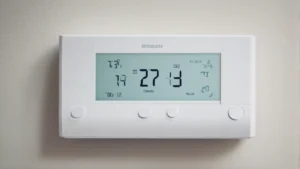
If you are considering a smart thermostat, the Check price on Amazon is a solid pick. It saves up to 23% yearly on heating and cooling costs compared to a fixed 72-degree hold. The color touchscreen and free software upgrades mean it gets better over time. It works with 85% of HVAC systems, and the ecobee app lets you monitor energy use on the go.
What a smart control system actually does differently

A standard thermostat holds a temperature. That is all. You set it, it cycles the heater until the room hits that number, then waits. It does not know if you left for work, if the sun just came through the window, or if the kids opened the back door.
A smart control system adds context. It uses sensors, Wi‑Fi, and algorithms to decide when to heat and when to back off. Instead of reacting to temperature, it anticipates. That shift – from reactive to predictive – is where the efficiency gains come from.
For example, a smart thermostat can detect that nobody is home by checking geo‑fencing on your phone. It then drops the temperature to an energy‑saving level. When you start driving back, it warms the house so you arrive comfortable. No wasted heat for eight empty hours.
Real numbers matter here. The U.S. Department of Energy says you save 1% on your heating bill for every degree you lower the thermostat over an eight‑hour period. If you normally keep it at 70°F and drop to 62°F while away, that is 8% savings each day. Over a heating season, that adds up fast.
One caveat: the savings depend on your climate and insulation. A drafty house loses heat quickly, so the recovery time costs more. Smart systems handle this better than manual schedules because they factor in outdoor temperature and your home’s thermal properties. But no thermostat fixes bad insulation – seal the leaks first.
Three core features that drive efficiency
Not all smart controls are equal. The ones that actually save money share three things.
Geofencing and occupancy detection
Geofencing uses your phone’s location to know when you leave and return. The system sets a temperature for away mode automatically. You do not need to remember to turn down the heat. Some systems also use motion sensors in the thermostat itself or remote sensors to detect if a room is occupied. This matters more for zoned heating – no point heating a guest bedroom that nobody uses.
If you want to dig into the details of setting up remote access and location triggers, check the remote control guide on HeaterGuides.
Adaptive scheduling and learning
Old programmable thermostats let you set Monday through Friday 6 AM warm, 8 AM away, 5 PM home. But real life is messy. You come home late Tuesday, leave early Thursday. A learning thermostat watches your patterns for a week or two, then builds a schedule that matches your actual routine. It can also adjust for sudden changes – like a snow day when the kids are home.
The ecobee system, for example, lets you set a schedule manually or let it learn. The app gives you a weekly energy report so you see exactly what each adjustment costs. That feedback loop is critical. Without it, most people set a schedule and forget it.
Weather integration and predictive recovery
A smart thermostat pulls local weather forecasts. If a cold front is coming tonight, it knows to start heating earlier to hit your target temperature when you wake up – but only enough to meet that target, not overshoot. Predictive recovery means the system calculates how long your heater takes to raise the temperature, then starts at the right time instead of running at full blast for an hour.
This alone can knock 5–10% off your bill because the heater ramps up gradually rather than cycling on and off at maximum output.
Setting up your system for maximum savings – step by step
Buying a smart thermostat is not enough. You need to configure it properly. Here is a sequence that works.
- Install the thermostat – Most smart thermostats need a C‑wire for power. If your home lacks one, a power extender kit (PEK) like the one ecobee sells separately solves that. Check compatibility online before buying. The installation usually takes 20–30 minutes if you are handy with a screwdriver.
- Set your baseline temperature – Decide a comfortable home temperature (say 68°F awake, 62°F asleep/away). Enter these into the system. Do not set extreme setbacks – recovering from 50°F costs more energy than maintaining 62°F in most homes.
- Turn on geofencing – Allow the app location access. Set the away radius (0.5 miles works well). Test it by leaving the house and checking if the thermostat switches to away mode within a few minutes.
- Enable learning or set a schedule – If your thermostat learns, let it run for two weeks without manual overrides. If you prefer manual, program your typical week. Include different times for weekends.
- Add remote sensors – Place sensors in bedrooms or living areas where you spend time. This tells the system to heat those rooms to priority, not the hallway where the thermostat sits. You can find more about customizing comfort settings on HeaterGuides.
- Monitor energy reports – Check the app weekly for the first month. Look for patterns – does the system run more than expected during certain hours? Tweak the schedule or temperature to reduce runtime.
- Set vacation mode – If you leave for more than 24 hours, use vacation mode instead of away mode. Vacation mode holds a consistent low temperature (55–60°F) to prevent pipes from freezing without wasting heat.
Comparing smart control methods
The table below breaks down three common approaches to heater control. Not every system fits every home, so match the method to your lifestyle and equipment.
| Control method | How it works | Typical savings | Best for |
|---|---|---|---|
| Basic programmable thermostat | Fixed daily schedule you set manually | 5–10% vs. constant hold | Homes with predictable daily routines |
| Smart thermostat with geofencing | Uses phone location to switch modes automatically | 10–15% vs. basic schedule | People who leave at irregular times or have multiple occupants |
| Smart thermostat with remote sensors and learning | Adapts schedule based on occupancy patterns and room sensors | 15–23% vs. constant hold | Larger homes, multi‑zone systems, families with varying schedules |
Note that percentages are estimates. Your actual savings depend on climate, insulation, and how aggressively you set temperatures. The ecobee claim of up to 23% comes from controlled testing against a fixed 72°F hold – your results will vary.
Frequently asked questions about smart control systems
Do smart thermostats really save money on heating?
Yes, but only if you use the features. If you just set a schedule and ignore the app, you get the same savings as an old programmable thermostat. The real money comes from geofencing, occupancy detection, and adaptive start – things that reduce runtime without you thinking about it. Most people see a 10–15% drop in their first heating season.
Will a smart thermostat work with my old boiler or baseboard system?
It depends on the wiring. Many smart thermostats work with gas, oil, electric, and heat pump systems. But older 2‑wire systems (heat only, no common wire) may require a power adapter like the ecobee PEK. Check the manufacturer’s compatibility tool before buying. If your system uses line voltage (120/240 volts), you need a different type of thermostat – standard smart thermostats run on low voltage (24 volts).
How long does it take to recoup the cost of a smart thermostat?
If