Reading a thermometer is a quick DIY job that takes about 1 to 2 minutes once you know the screen: read the number, check the scale, and confirm any status icons. No permit is needed for a home thermometer, and the only real risk is misreading a low battery or a bad placement as a real temperature.
A thermometer reading is only useful when you know which number matters and which symbol is just the device talking to itself. The half-true belief is that the big number is always the answer; the true half is that it usually is, but only after you confirm the scale and wait for the final reading.
Most confusion comes from skipping the small print on the display. A flashing icon, a Lo message, or a tiny F or C can change the meaning fast enough to make a simple check useless.
Key takeaways
Read the main number first, then check F or C before you trust it.
Lo usually means the thermometer is below its readable range, not that the person is freezing.
Hi and Err mean retry the reading before you act on it.
A steady final reading matters more than a flashing or changing screen.
No permit is needed for a household thermometer, but a damaged device should be replaced.
How To Read A Thermometer
To read a thermometer, start with the main number, check whether the scale is °F or °C, then look for a status icon; the reading is ready when the screen stops flashing or the thermometer beeps. For a dial, read the number where the needle points, and for a no-touch forehead thermometer, aim and measure as its manual directs before reading the displayed temperature.
Reading a thermometer correctly means checking the value and the device’s mode, not guessing from a number alone. A low-battery symbol, object-mode icon, or flashing screen can change what the display means. Digital models show a number; dial thermometers use a pointer and scale marks; infrared forehead models measure without touching the skin.
Gather These First
The thermometer
Fresh batteries, if needed
The thermometer’s manual
A clean cloth for the sensor area
1
Turn It On
Press the power button and wait for the display to wake. Check that the screen is clear and that the thermometer is in the mode you intend to use.
2
Find The Main Number
On a digital or infrared model, read the large number on the screen. On a dial, follow the needle to the numbered mark; if it falls between marks, estimate only as precisely as the scale allows.
3
Check The Scale
Look for °F or °C beside the number, sometimes in a corner of the display. Don’t assume the scale from the size of the reading.
4
Check The Status
Look for a battery, mode, or other status icon. A forehead thermometer may also show a body or object mode, so confirm it’s set for the measurement you’re taking.
5
Wait For A Finished Reading
If the screen is flashing or the device is still measuring, wait until the flashing stops or you hear its completion beep. Use the finished value, not a number that appeared mid-measurement.
Worked Example
A display showing 98.6 °F and one showing 37.0 °C represent the same temperature, approximately. The numbers look different because Fahrenheit and Celsius use different scales, so check the unit mark before interpreting the result.
Display A98.6 °F
Display B37.0 °C
Key checkRead the scale mark
If you need a quick forehead reading, an infrared model can show the result without touching skin; follow its instructions for distance and positioning, since those details vary by device.
For a quick forehead reading
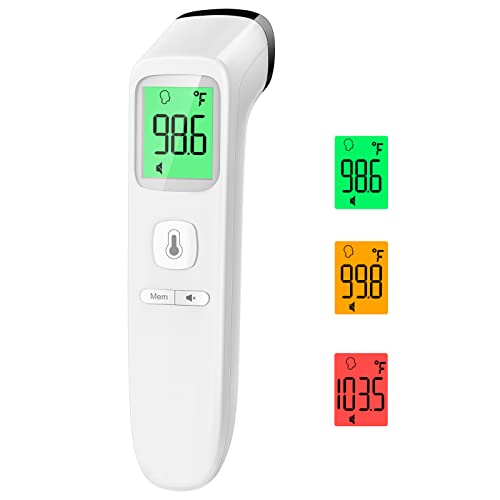
Goodbaby No-Touch Thermometer for Adults and Kid, Accurate Baby Therm…
Product 1 offers forehead and object modes and displays readings in Fahrenheit or Celsius. It can make a quick check easier, but you still need to select the right mode and follow its measuring instructions.
For a closer walkthrough of positioning and forehead measurement, see how to read a forehead thermometer correctly. A dial’s scale and a digital screen are read differently, but the same habit helps with both: identify the number, verify the unit, then confirm the reading is complete.
Read Fahrenheit And Celsius Without Guessing
To read a thermometer in Celsius or Fahrenheit, find the °C or °F beside the main number before interpreting it; the same temperature has different numbers on each scale. A Celsius thermometer reading of 37.0°C is about 98.6°F, a common body-temperature benchmark, not a rule for every person or every measurement method.
For a digital display, look for a small C or F near the digits or in the settings. On a dial thermometer, check the scale printed around the face; a liquid-column thermometer may have °C or °F marked beside its numbered lines. That’s how to read a thermometer scale without mistaking one unit for the other.
Fahrenheit
Celsius
What the mark means
98.6°F
37.0°C
Common body-temperature benchmark; individual readings vary
100.4°F
38.0°C
Commonly treated as a fever threshold in home use
°F
°C
The unit shown beside the number tells you which scale you’re reading
Use the unit printed on the thermometer; don’t convert by guessing.
To read a Fahrenheit thermometer, use the number beside °F; to read a Celsius thermometer, use the number beside °C. For example, 38.0 on a screen marked °C is 38.0°C, not 38°F. A digital screen shows digits and a unit mark, a dial has a pointer over numbered marks, and a liquid thermometer shows a column against a scale.
37.0°C ≈ 98.6°F
Common body-temperature benchmark
A reading of 38.0°C (100.4°F) is commonly treated as a fever threshold in home use. Temperature can vary by person and by how and where you measure it, so use the thermometer instructions and relevant medical guidance to interpret a result.
Fix Lo, Hi, And Err Readings
On a digital thermometer, Lo usually means the temperature is below the device’s measuring range or the sensor hasn’t locked onto a reading; Hi usually means it’s above range, while Err signals a failed reading. Check the manual for your model, since display symbols and their meanings can differ.
For thermometer display meaning, separate a live result from a status mark: flashing numbers may mean the device is still measuring, dashes can indicate no completed reading, and a memory icon usually marks stored data rather than the current result. To check a correct digital thermometer reading, wait for the final beep or a steady screen and confirm the number is not marked as stored.
Check the conditions
Indoor drafts, cold skin, or poor contact can produce a reading that doesn’t reflect the temperature you meant to measure. Follow the manual’s placement instructions, especially for contact and infrared models.
1
Reset the thermometer
Turn it off and back on, or use the reset procedure in the manual. Check that the display starts normally.
2
Check placement
Position the sensor as the manufacturer directs; make sure a contact probe has proper contact and an infrared sensor is aimed at the specified surface.
3
Wait for completion
Hold it in place until the final beep or a steady screen appears. Don’t use a flashing or unfinished number as the result.
4
Retake in stable conditions
Repeat the measurement in a stable room, following the same placement instructions. If Err or Lo persists, check the manual’s range and battery guidance.
Protect the sensor and yourself
Replace the battery only as the manual directs, using the specified type and polarity; keep small batteries away from children. Don’t use a thermometer with a cracked probe or damaged sensor, and don’t open or repair a damaged unit while it’s powered.
Avoid Mistakes That Spoil The Reading
To read a digital thermometer, wait until the screen stops flashing and the number settles, then check the scale and measurement mode. A digital display can show a real temperature alongside memory, hold, or backlight indicators; those features don’t make the temperature more current.
Keep the probe in place while it takes a reading, and don’t stand where a draft can change the air around the sensor. Switching modes mid-measurement can also interrupt the result, so select the correct mode first and let the device finish. The same rule applies to a digital thermometer reading or any other digital temperature display: wait for a stable number before recording it.
Myth
Any number on the screen is the final temperature.
Fact
A flashing number may still be changing, while a hold or memory reading may be from an earlier measurement. Check the screen for those indicators and wait for the current reading to settle.
Household Thermometers Need No Permit
Reading a household thermometer doesn’t require a permit or licensed professional. A licensed technician is relevant if the sensor is built into HVAC controls or another fixed system; don’t adjust system wiring based on a handheld thermometer reading.
If a probe thermometer is meant to touch a surface or person, follow its instructions for that measurement. Moving it before the measurement is complete can leave you with a number that looks precise but isn’t useful.
What To Do Next With A Bad Reading
To read a thermometer correctly, confirm the °F or °C scale and where the temperature was measured, then retake the reading if the screen flashed, changed, or showed a stale hold value. A normal thermometer reading depends on the measurement site, so don’t compare a room reading with a body-temperature reference.
98.6°F / 37.0°C
Common body-temperature reference
A temperature of 100.4°F / 38.0°C is a commonly used fever threshold. Body temperature varies, and the measurement method and site matter.
If the display keeps showing Lo, Hi, or Err, install fresh batteries if the battery indicator is low, then clean the sensor as the manual directs and try again. Retire the device if the error persists with fresh batteries and a clean sensor, or if it gives inconsistent readings; don’t rely on it for a decision that needs an accurate temperature.
Choose Your Next Three Actions
Normal reading: confirm the scale, note the measurement site, and use the result for that site.
Borderline or unstable reading: keep the same mode and site, wait for the display to settle, and retake it.
Unreadable or repeated error: check the batteries, clean the sensor according to the manual, and replace the thermometer if the error remains.
For a body-temperature measurement, use the instructions for your thermometer type; a clinical thermometer has its own correct placement and timing.
Frequently Asked Questions
How do you read a digital thermometer display?
Read the main temperature number, then check the °F or °C label and any mode or status icon. If the display is still flashing or changing, wait for the device’s completion signal before recording the result.
What does Lo mean on a digital thermometer?
“Lo” can mean the measured temperature is below the thermometer’s range, or that the sensor hasn’t produced a stable reading yet. Check the manual for that model, then reposition the sensor and take another reading.
How do you read a thermometer in Celsius?
Look for °C beside the number; the scale label tells you the reading is Celsius. For a quick conversion to Fahrenheit, multiply the Celsius value by 9, divide by 5, then add 32.
What does Hi or Err mean on a thermometer?
“Hi” generally indicates a temperature above the device’s measuring range, while “Err” signals an error the model defines in its manual. Check the measurement mode and sensor placement, then restart or retake the reading; persistent errors may point to a sensor or battery problem.