Thermostats For Electric Baseboard Heating: Don’t Buy The Wrong One
On this page 9 sections
- Smart Thermostat Comparison
- Top Smart Thermostats For Home Heating
- Thermostats For Electric Baseboard Heating
- Check The C-Wire Before You Buy
- Choose By Control Style And Room Use
- Size The Thermostat To Your Heating Bill
- Safety, Certifications, And Install Limits
- What To Do Next For Your System
- More Questions, Answered
Smart Thermostat Comparison
| Rank | Model | Best for | Compatibility | C-wire | Smart control | Price |
|---|---|---|---|---|---|---|
| 1 | Honeywell Home T5 Smart Wi-FiBest Overall | Most homes with a C-wire and regular heating schedules | — | Required; C-wire power adapter required | Wi-Fi, Alexa Ready, geofencing, 7-day scheduling | Check price |
| 2 | Google Nest ThermostatBest C-Wire Backup | Homes where a thermostat may need to work without a C-wire | Most homes; some heat-only, cooling-only, zone-controlled, and heat-pump systems | Designed to work without one in most homes; some systems need a C-wire or compat | Google Home app, remote control, automatic away adjustment | Check price |
| 3 | Sensi Smart Thermostat ST55Best DIY Controls | Most homes wanting simple DIY setup and familiar buttons | HVAC equipment found in most homes; check compatibility | Not required in most applications | Wi-Fi, app control, remote access, Alexa | Check price |
| 4 | meross Matter Smart ThermostatBest Matter Integration | Homes using Matter, Apple Home, Alexa, Google Home, or SmartThings | 95% of HVAC systems; includes heat pump, air conditioner, furnace, boiler, and d | Some configurations require a C-wire; not included | Matter, Apple Home, Alexa, Google Home, Home Assistant, Samsung SmartThings, app | Check price |
| 5 | Honeywell Home X2S Smart Wi-FiBest Flexible Scheduling | Conventional or heat-pump systems needing flexible schedules | Up to 2 heat/2 cool conventional; up to 2 heat/1 cool heat pump with electric ba | — | Wi-Fi, First Alert app, Matter, Alexa, Google Assistant, Apple HomeKit | Check price |
Say your house uses a forced-air furnace and the old thermostat is dead. A smart thermostat can save you from walking room to room with a flashlight, but only if it matches your wiring and heating system.
The wrong one is easy to buy and annoying to return. Electric baseboard heat, a boiler, and a heat pump all have different thermostat needs, and the C-wire question matters before you click buy.
Top Smart Thermostats For Home Heating

Honeywell Home T5 Smart Wi-Fi

Google Nest Thermostat

Sensi Smart Thermostat ST55
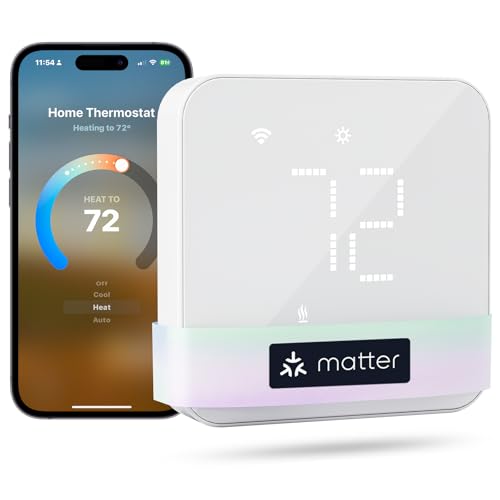
meross Matter Smart Thermostat

Honeywell Home X2S Smart Wi-Fi
Thermostats For Electric Baseboard Heating
For thermostats for electric baseboard heating, buy a line-voltage thermostat rated for the heater’s voltage and current—not a standard low-voltage smart thermostat. Most picks in this roundup, including the Honeywell Home T5, Google Nest Thermostat, meross, Honeywell Home X2S, and Sensi, are intended for conventional HVAC systems, boilers, or heat pumps. They generally don’t switch 120- or 240-volt baseboard loads directly.
| Your heating setup | Thermostat type | What to do |
|---|---|---|
| Electric baseboard or wall heater on a 120-240V circuit | Line-voltage thermostat rated for that voltage and current | Skip these low-voltage picks; choose a baseboard-rated thermostat |
| Gas, oil, or conventional electric HVAC | Low-voltage HVAC thermostat | Check wiring and system compatibility before buying |
| Heat pump or boiler | Compatible low-voltage HVAC thermostat | Confirm the system type and control wiring |
 Winter Heating Bill CutterSee what every heater in your home really costs, heat the rooms you use, and cut the waste in 30 days.Cost-per-hour tables for every heaterThermostat schedule and draft-proofing planRunning-cost and bill calculator (Excel)
Check The C-Wire Before You Buy
A C-wire is the one wire that decides whether most smart thermostats work in your house. It’s a fifth conductor — usually blue — that feeds 24 V continuously from the furnace or air handler, so the thermostat runs on system power instead of stealing it or leaning on batteries.
Pull the old thermostat off its subbase and count the terminals. If you see a wire landed on C, you’re done: the Honeywell Home T5 drops straight in. No wire on C? The Nest is built for that case and can usually run without one, pulling a trickle of power through the existing conductors. The T5 needs a C-wire power adapter in that situation, and the adapter is a small box you mount at the equipment, not a plug-in wall wart.
Quick Answers On Thermostat Power And Settings
- How to change the battery in a heating thermostat: kill the breaker or furnace switch first, pull the faceplate, match the coin cells or AA cells to the old ones, and note the polarity. On a C-wire model, dead batteries usually mean the C-wire isn’t actually connected.
- Smart thermostat not heating or cooling: check that the system switch is on HEAT, the fan is on AUTO, and the schedule is calling for a temperature above the current reading. If the display is alive and the equipment is silent, the call isn’t reaching the board.
- What is an RF thermostat: a wireless thermostat with a radio link to a receiver wired at the boiler or air handler. It needs mains power at the receiver, not a C-wire at the wall, and it’s common on combi boilers and older UK-style systems.
- Thermostat stopped working on a central heating and cooling system: the fault can sit in the thermostat, the low-voltage wiring, or the control board. Before you buy a replacement, jump R to W at the subbase for a second — heat comes on, the thermostat is the problem; nothing happens, look at the wiring or board.
- How to switch a heating thermostat to manual: most models have a HOLD or MODE button; hold the setpoint and press it, or turn the schedule off in the app. That overrides the program without deleting it.
Choose By Control Style And Room Use
Choose the thermostat by how your household runs: geofencing suits changing departure times, while a simple schedule wins when your routine stays predictable. Smart thermostats improve heating control and can reduce unnecessary run time, but they don’t repair poor insulation or add capacity to an undersized system.
To put a heating thermostat on manual instead of auto, select Hold, Manual, or Permanent Hold on the thermostat or in its app, then choose the temperature. A temporary hold usually lasts until the next scheduled change; permanent hold stays until you cancel it. An Advance command moves the heating programmer to the next scheduled period, but the thermostat still controls the room temperature.
Remote control requires the thermostat to be connected to its app and home network; once paired, change the setpoint from the app rather than at the wall. For an away period, use the app’s Away setting or lower the temperature manually. The exact labels depend on the model.
| Pick | Control style | Best room use |
|---|---|---|
| Honeywell Home T5 | 7-day scheduling and geofencing | Homes with changing schedules |
| Google Nest Thermostat | Remote control and learning-style energy tools | People who want the thermostat to adapt |
| meross Matter Smart Thermostat | Matter and multi-platform control | Homes built around compatible smart-home platforms |
| Honeywell Home X2S | Matter support | Matter-equipped smart homes |
| Sensi Smart Thermostat | Check its listed app and schedule controls | Buyers who prefer a straightforward connected thermostat |
The Honeywell Home T5 is the clearest fit for a household that wants a full seven-day plan plus geofencing. Set weekday and weekend changes, then let location-based control adjust the home when your arrival time shifts. The Google Nest Thermostat is better suited to people who want remote adjustments and learning-style energy-saving tools rather than building every change themselves.
Matter is the deciding feature for the meross and Honeywell Home X2S if you want control through a compatible smart-home platform and its voice assistant. Voice support depends on the platform and setup, so confirm compatibility before buying; Matter makes the connection broader, not automatic. If energy use is your main concern, compare the control features with a guide to smart thermostat energy savings.
Size The Thermostat To Your Heating Bill
Smart thermostats improve heating costs by reducing wasted run time; they don’t make electricity, gas, or oil cheaper. A thermostat changes when the system runs, so the useful comparison is your old schedule versus the new one.
The basic electric formula is watts ÷ 1,000 × hours × your electricity rate. For example, a 1,500 W heater uses 1.5 kWh each hour, so cutting two operating hours from a day removes 3 kWh from that day’s use. That is an illustration, not a promised saving: insulation, outdoor temperature, and the heater’s actual duty cycle decide the result.
| Heater | Watts | Per hour | Per day (8 h) | Per month (30 days) |
|---|---|---|---|---|
| 1,500 W electric heater | 1,500 W | 26¢ | $2.04 | $61.20 |
For fuel-fired heat, savings come from burner runtime, setback size, and recovery time. A modest setback during work or sleep can help, while an aggressive setback may make the boiler or furnace run for a long recovery period. Gas and oil systems also have startup and shutdown behavior that electric resistance heaters don’t share.
There is no single optimal setting for heating thermostat. Use the lowest temperature that remains comfortable, then schedule setbacks for predictable empty periods; geofencing suits households whose departure times change. Changing the setpoint normally doesn’t damage the thermostat or heater, but repeated manual changes can defeat the schedule and a faulty thermostat can cause short cycling.
For smart thermostat for baseboard heating or any electric heating thermostat, first identify the electrical system. Standard smart thermostats are low-voltage controls; electric baseboard heaters generally need a line-voltage thermostat matched to the heater’s voltage and current. The Honeywell Home T5, Nest, and similar low-voltage models aren’t interchangeable with that setup.
Honeywell Home T5 materials say scheduling saved customers 8% to 16% on heating and cooling bills, while Sensi says it can help save about 23% on HVAC energy. Those are product claims, not guarantees. Nest and Honeywell Home X2S also offer energy features, so choose the control style you’ll actually leave enabled.
Safety, Certifications, And Install Limits
A smart thermostat is a low-voltage control, so gas-line work, venting, boiler piping, and 240 V line-voltage work belong to a licensed professional where local code requires it. A wall display may look simple; the equipment behind it may involve combustion, high voltage, or pressurized hot water.
A broken thermostat can stop a heat call and leave a zone valve or motor valve waiting for a signal. Wrong wiring or configuration can also cause short cycling, or leave a system stuck in the wrong operating state. If a thermostat has trouble changing from cooling to heating, check the mode and configuration first; persistent central-heating thermostat problems need a technician.
Electric baseboard heat is a separate category, and the Honeywell Home X2S explicitly doesn’t work with electric baseboard heating. ENERGY STAR, Matter, and app functions describe efficiency features, compatibility, or convenience; none is a substitute for the correct voltage rating, wiring, clearances, or required professional installation.
For a battery-powered heating thermostat, switch off the system if the instructions call for it, open the battery compartment, and install the specified battery type with the positive and negative ends aligned. Replace the cover, restore the mode and schedule, and test one heat call; leaking, corroded, or repeatedly dead batteries point to a service problem rather than a reason to keep swapping cells.
What To Do Next For Your System
Put the heating thermostat on manual by selecting Manual, Hold, or Override and setting your target temperature; Auto usually means the programmed schedule or fan setting remains in charge. For gas heat, change the room setpoint only—never adjust the gas valve, burner, or wiring yourself.