Pick a PID controller for fast or sensitive heating loads, and a basic on/off temperature controller for slow, forgiving jobs where a few degrees of swing won’t matter. A PID trims power in small steps, while simple temperature control switches full power on and off around the setpoint.
A half-true belief hangs around this topic: PID is better. The useful half is that PID gives tighter control; the missing half is that a basic temperature controller is often the better tool when the load is slow, rugged, or cheap to replace.
If you’re comparing them for a heater, brew kettle, incubator, kiln, or water tank, the real question is how much temperature swing your process can live with before comfort, quality, or safety starts to slip.
What to remember
Choose PID when overshoot would cause trouble or when the load changes fast.
Choose simple on/off control when the system has a lot of thermal mass and can tolerate a wider band.
A PID needs the right sensor and output stage, usually a relay or SSR, before it can do useful work.
Bigger heat output does not make a controller smarter; the control method only changes how the power is delivered.
If you’re fixing a bad temperature setup, check the sensor, wiring, and setpoint before you replace the controller.
Temperature controller vs PID controller at a Glance
Factor
Temperature controller
PID controller
Control method
Switches heater power on and off around the setpoint.
Adjusts output in small steps using proportional, integral, and derivative control.
Temperature swing around setpoint
Usually wider, especially with a slow sensor or large heater.
Usually tighter when tuned correctly.
Speed of response
Best suited to slow loads that tolerate gradual correction.
Better suited to fast or sensitive loads.
Need for tuning
Little or no tuning beyond the setpoint and differential.
Requires tuning so the response does not overshoot or oscillate.
Sensor quality sensitivity
Often more forgiving of basic sensor behavior.
More dependent on a correctly wired, suitable sensor and stable reading.
Output style
Varies by model; verify whether it uses a relay or another output.
Requires an SSR or relay; the listed kits include a 40DA SSR.
Best fit for slow loads
Pool heaters and other loads where a few degrees of swing are acceptable.
Can work, but added control may not justify the setup.
Best fit for fast or sensitive loads
May overshoot or cycle more than desired.
Small heaters and sensitive processes benefit from tighter control.
Choose Temperature controller if…
Choose the temperature controller side for slow, forgiving loads and a simpler installation with less tuning. It’s the sensible fit when a small temperature swing won’t affect the result.
Choose PID controller if…
Choose the PID side for fast heaters or processes where overshoot matters. Confirm the sensor type, SSR or relay arrangement, and tuning requirements before wiring it in.
Broad voltage range
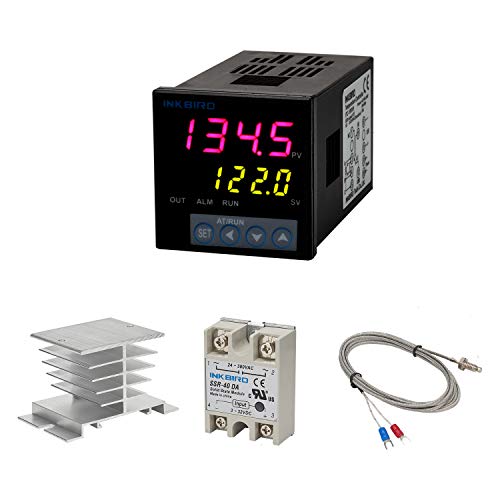
Inkbird PID Controller Kit
Best for Heating setups needing a K-type or Cu500 sensor
The kit accepts a K-type thermocouple or Cu500 sensor and displays the current temperature and setpoint at once. Its included 40DA SSR handles the switching connection, while the alarm relay can drive a buzzer.
Supply voltage AC 100–240VSensor support 3-wire or 2-wire; K type thermocouple and Cu500SSR 40DA includedAlarm output AC250 V, 3 A (resistive load), ON or NC
Why it made the cut
Supports K-type and Cu500 sensors
Includes a 40DA SSR
Displays temperature in Celsius or Fahrenheit
Good to know
Requires an external SSR or relay to control the load
Alarm output is rated for resistive loads
Skip it if Skip it if you need a controller that switches the heater directly without an external SSR or relay.
Best for Setups using supported thermocouples, PT100 or Cu50 sensors
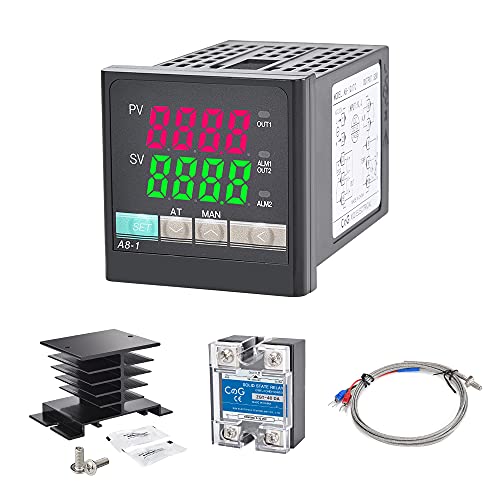
CGELE lists several sensor options beyond K type, including PT100 and Cu50, which helps if your existing probe is one of those types. The package includes a 40DA SSR, and the two display windows keep the reading and target visible together.
Supply voltage AC 100~240VSensor support 3-wire or 2-wire; K, E, J, N, W3-25 and W5-26 thermocouples,SSR 40DA includedAlarm output AC220V/DC30V 3A (resistive load), ON/NC
Why it made the cut
Supports K, E, J, N, W3-25 and W5-26 thermocouples, plus PT100 and Cu50
Includes a 40DA SSR and black heat sink
Displays in Celsius or Fahrenheit
Good to know
Requires an external SSR or relay to control the load
Alarm output is rated for resistive loads
Skip it if Skip it if your sensor is not among the supported types or you want a direct-switching controller.
For fast or sensitive heating, choose PID; for a slow load that can tolerate a few degrees of swing, basic on/off temperature control is usually enough. Automatic temperature control means a sensor and controller switch or adjust heat to work toward a setpoint; without it, you must manage the heat manually.
The difference in temperature control is how the heater responds to being above or below its target. On/off control switches full power on and off around the setpoint. PID control adjusts output in smaller steps to hold temperature more tightly. Which is better depends on how quickly the load heats and cools, and how much temperature swing it can accept.
Myth
PID is always better than basic on/off control.
Fact
That’s only half true: PID can hold a tighter temperature, but a slow, forgiving load may not need that precision. A simpler on/off controller can do the job with less setup.
Choose PID when temperature changes quickly or even a small overshoot matters. Choose on/off for a slower load where a modest swing is acceptable. The Inkbird PID Temperature Controller Kit and PID Temperature Controller Kit are examples of PID products; the label alone doesn’t tell you whether a particular kit suits your heater. Check the sensor and output compatibility before choosing.
How Each Controller Regulates Heat
A temperature controller regulates heat by comparing a sensor reading with your setpoint, then changing the heater’s output. The key difference is whether it switches full power on and off or adjusts output to narrow the gap.
Control type
What it does
What you may notice
On/off
Runs at full power until the temperature reaches the setpoint, then turns off until it crosses back over a set band.
Temperature rises and falls around the target.
PID
Adjusts output using the current error, past drift and rate of change.
Output can ease back as the load approaches the target.
The set band is the range that triggers switching; the exact setting depends on the controller.
On/off control is straightforward: if the sensor reads below the setpoint, the heater runs; once the temperature reaches the switching point, the controller cuts power. It stays off until the reading falls across the other side of the band, then switches on again. That band prevents constant switching around one exact number.
PID stands for proportional, integral and derivative. Proportional response reacts to how far the current reading is from the target; integral accounts for drift that persists over time; derivative responds to how quickly the temperature is changing. Together, those corrections can reduce overshoot by backing off power as the load approaches the setpoint.
The label isn’t the whole setup
A controller marked PID still needs a compatible temperature sensor and an output stage suited to the heater. If either doesn’t match, it may not measure or control heat as intended.
Check the control loop
The loop is the path from sensor to controller to heater and back to the sensor. For a plain-language walkthrough of that process, see how temperature controllers work.
Measure The Load Before Buying
For a pool heater, a basic on/off temperature controller is usually the better fit because pool water changes temperature slowly; a PID is more useful for a small heater element or another fast, sensitive load. If “hang them up pool heater temperature controller” means mounting the controller near a pool heater, follow its installation instructions and keep the control and sensor in the locations specified by the manufacturer. The right temperature control depends on how quickly the load responds.
A large body of water has high thermal mass: it takes time to warm up or cool down, so a few degrees of cycling may be acceptable. A small volume or low-mass element responds quickly, and can overshoot its target before an on/off controller reacts. That’s where PID’s smaller adjustments can help.
Large Bath Versus Small Element
Say a large water bath warms slowly, while a small heater element can change temperature quickly. The bath can usually tolerate on/off cycling; the element benefits more from PID control if its temperature needs to stay within a narrow range.
Large water bathSlow response; on/off control can suit i
Small heater elementFast response; PID can limit overshoot
No extra heat
What a controller provides
A controller doesn’t increase the heater’s capacity. It decides when and how the heater delivers its available heat.
Best fit
On/off control wins for slow, forgiving loads. PID wins when the load responds fast or needs a tighter temperature range.
Running Cost Comes From Cycling, Not Magic
A PID controller and an on/off temperature controller use the same heater wattage; the load and how long the heater runs determine energy use, not the controller label. With auto temperature control, the heater switches or adjusts output around a target; without temperature control, it may keep heating until someone turns it off, so you have to manage it yourself.
Heater
Watts
Per hour
Per day (8 h)
Per month (1 days)
1,500 W heater
1,500 W
26¢
$2.04
$2.04
Calculated at 17¢ per kWh. Worked example: 1,500 W ÷ 1,000 × 8 hours = 12 kWh. At $0.17 per kWh, that’s about $2.04 for eight hours.
PID can reduce overshoot and unnecessary cycling in some systems, but it can’t make resistance heat free. A badly tuned controller or an oversized heater can still waste energy: the heater may deliver more heat than the load needs, or the controller may not regulate it well. The electricity rate and actual run time matter, too.
Check the run time
Compare energy use over the same period, not just controller types. A 1,500 W heater running for eight hours uses 12 kWh whether it’s controlled by PID or switches on and off; differences come from how the system behaves over time.
For a stable load that holds its temperature without much overshoot, neither controller has an automatic cost advantage. PID wins on cost when it prevents substantial overshoot in a system that would otherwise waste heat.
Safety, Noise, And Installation
Safe installation depends on the heater, sensor, and switching device—not the label on the controller. If you’re asking how a temperature controller regulates temperature, it reads the sensor, compares that reading with the setpoint, and changes the heater output; cooling works in reverse by removing heat or waiting for the load to fall.
If an Edna temperature controller isn’t heating up, a normal-looking display doesn’t prove the heater circuit works. A miswired sensor or the wrong relay or solid-state relay can give a believable temperature reading while sending no usable power to the heater.
1
Read the heater manual
Confirm the required voltage, current, sensor type, wiring terminals, and whether the controller may switch the heater directly.
2
Match the switching device
Use a relay or SSR rated for the heater’s voltage and current, with the required heat sinking or protection. Don’t assume a controller’s output rating covers the heater.
3
Shut power off
Disconnect power before wiring or changing terminals. If the circuit uses mains voltage or the wiring is unclear, use a licensed electrician.
Protect the circuit
Follow the heater manual, match voltage and current, and keep the sensor away from direct element heat unless the instructions call for that placement. A wrong connection can damage the controller, heater, or wiring.
On/off temperature controllers click more because their mechanical relay makes a hard switch each time. A PID paired with an SSR is usually quieter; a PID using a mechanical relay still clicks.
Which side wins
Choose an on/off controller for the easier, simpler installation when the heater and load tolerate temperature swings. Choose a PID with an SSR when quieter operation matters and the wiring, heat sinking, and tuning can be done correctly.
Lifespan Depends On How Hard You Switch
Frequent full-power switching wears a mechanical relay faster, so simple temperature controls suit long-lived systems best when the load changes slowly and the relay doesn’t chatter. Automatic temperature control is the broader idea; PID and on/off controllers are two ways to carry it out.
Part
What causes wear
What helps
Mechanical relay
Frequent switching and electrical arcing
Wider control tolerance and fewer rapid cycles
Solid-state relay
Heat and incorrect sizing
Adequate heat sinking and a properly rated device
Sensor
Excess heat, poor placement, and wiring stress
Secure mounting and protected cable routing
Heating element
Repeated thermal expansion and overheating
Stable control and the heater’s specified limits
The controller type changes the stress pattern; it doesn’t make every part last forever.
Myth
A PID always extends the life of every heater and control part.
Fact
A well-tuned PID can reduce temperature swings and soften the load’s on-and-off pattern, but a badly tuned PID can cycle a mechanical relay too often. An SSR has no mechanical contacts, so it removes relay-contact wear while making heat dissipation more important.
Sensors usually fail from heat exposure, poor placement, crushed or strained cable, and loose connections—not from the word PID on the box. Check the sensor and its wiring before replacing a controller.
For a simple system, an on/off temperature control wins for long life when its relay switches infrequently; where tighter control protects a sensitive load, a properly tuned PID with an SSR wins.
What To Do Next For Your Setup
Start by matching the controller to the load, then verify the sensor, output, and voltage before replacing anything. A temperature controller regulates temperature by comparing the sensor reading with the setpoint and switching or trimming heater power.
1
Classify the load
Decide if the load is slow and forgiving, such as a large water mass, or fast and sensitive, such as a small heating element. Choose PID control when tight temperature control matters; use simple on/off control when a few degrees of swing won’t matter.
2
Check compatibility
Confirm the sensor type, controller output, heater voltage, and switching method. Match the replacement to the existing wiring and load rather than choosing by the word PID alone.
3
Inspect before replacing
If the controller is dead, turn off power and inspect the sensor, terminal screws, and wiring first. A failed sensor or broken connection can look exactly like a failed controller. For a repair sequence, see how to repair a temperature controller.
4
Choose the shortest sensible fix
Use a PID when the load overshoots, changes quickly, or needs a narrow temperature range. Otherwise, stick with basic control and save setup time, tuning work, and unnecessary parts.
Before you order
Load type: slow and forgiving or fast and sensitive
Sensor type and condition
Output type and heater voltage
Loose, damaged, or overheated wiring
A useful shortcut
The Inkbird PID Temperature Controller Kit and PID Temperature Controller Kit still need a compatible sensor, output, and voltage. A controller that fits the box can still be the wrong match for the heater.
Questions People Ask
What is the difference between automatic temperature control and no temperature control?
Automatic temperature control uses a sensor and setpoint to switch or adjust the heater without constant attention. A heater without temperature control runs from a manual switch or timer, so you must watch the temperature and shut it off yourself.
How does a temperature controller regulate temperature?
The controller compares the sensor’s reading with the setpoint, then changes the heater output. An on/off model applies full power in cycles, while a PID controller varies output to reduce overshoot and temperature swing.
When should I use a PID controller instead of a basic thermostat?
Choose a PID when the load heats quickly, the target temperature is sensitive, or overshoot can damage the process. A basic thermostat is the simpler choice for slow loads such as pool water, where a small temperature swing is acceptable.
Why is my temperature controller not heating up?
Start with the sensor and setpoint: a loose sensor wire, wrong sensor type, or a setpoint below the current reading can prevent a heat call. Then check that the output is driving the correct SSR or relay and that the heater has the required voltage; shut off power before inspecting wiring.
What type of temperature controller is best for a pool heater controller?
A basic on/off temperature controller usually fits a pool heater because the large water volume changes temperature slowly. A PID adds tuning and switching complexity that usually brings little benefit unless the pool system has an unusually fast heater and needs tighter control.