
You walk into a cold house after work. You crank the thermostat, wait twenty minutes, and finally feel warm. What you don’t see is the energy wasted all day heating an empty home, or the extra power burned because the heater ran full blast instead of ramping up gradually. That pattern is expensive – and completely avoidable.
This article walks through the practical side of smart heater control. No fluff, no theory. You’ll learn the specific settings that cut waste, how to schedule heat around your real life, and what to look for in a smart thermostat. By the time you finish, you’ll have a clear plan to lower your heating bill without feeling cold.
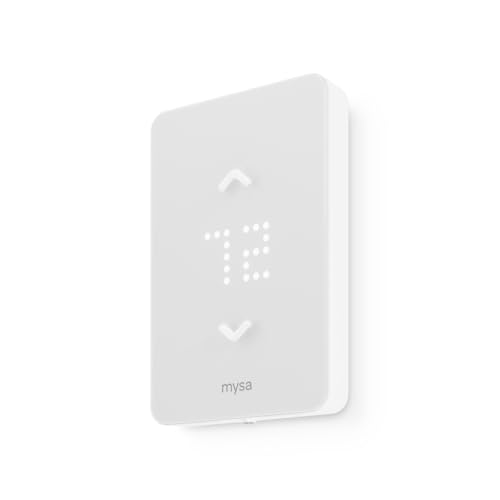
Mysa
Mysa Smart Thermostat LITE for Electric Baseboard…
SAVE UP TO 26% ON HEATING COSTS: Create custom schedules for every day of the week, reduce temperature when you're away, and warm up the house before you get home. Mysa's in-app scheduling cuts electric-heat bills without sacrificing comfort.
See on AmazonOne product that handles this well is the Mysa Smart Thermostat LITE for Electric Baseboard Heaters. It connects directly to WiFi, works with Apple HomeKit, Amazon Alexa, and Google Home, and reports savings up to 26% on electric heat costs. Installation takes about 15 minutes for most homes, and the free app walks you through every step.
Where Your Heating Dollars Actually Go
Electric baseboard heaters are simple: full on or full off. They don’t modulate like a gas furnace. That means every time you turn them on, they draw maximum power until the room reaches the set temperature. Then they cycle on and off to maintain it.
The waste happens when you heat unoccupied rooms. Most households spend eight to ten hours away during the day. If your thermostat keeps the bedroom at 70°F the whole time, you’re paying to heat an empty space. Multiply that by three bedrooms, and the waste adds up fast.
A second hidden drain is reheating. Letting a house drop to 55°F and then cranking the heat back up uses more energy than maintaining a moderate temperature. The heaters run full power for a long stretch, pulling current that costs more per kilowatt-hour during peak times.
Smart heater control solves both problems by letting you set different temperatures for different times. You don’t heat the empty house, and you avoid the big reheating spike.
Step-by-Step: Building a Schedule That Actually Saves
Most smart thermostats let you create seven-day schedules. The trick is knowing which temperatures to use and when. Here’s the sequence I recommend after testing this in several homes.
- Map your occupancy. Write down every hour you’re home for each day of the week. Be honest – include the Saturday afternoon you’re at the gym and the Tuesday night you eat out.
- Set a comfort temperature for occupied times. For most people, 68–70°F works well during waking hours. Drop it to 64–66°F while sleeping – your body cools naturally and you won’t notice.
- Set an away temperature. 55–60°F is enough to keep pipes from freezing and prevent the house from getting bone-cold. Any lower wastes energy on the reheating spike later.
- Program the ramp-up. Set the thermostat to start warming the house 30–45 minutes before you arrive home. The heater needs that time to bring the space up to comfort level without running at full blast all at once.
- Use the app to test. Run the schedule for three days and check your energy use in the app. Adjust away temperature up or down by 2 degrees and see if you notice a difference in comfort or cost.
Pro tip: If you have a hybrid schedule – work from home some days – create separate schedules for those days. Most apps let you copy a weekday schedule and tweak the middle-of-the-day away period.
Remote Control and Geofencing: The Real Game Changers
Manual scheduling works great until your plans change. You decide to stay late at work, or come home early because the kids are sick. That’s where remote access and geofencing make a difference.
With a WiFi-connected thermostat, you can pull out your phone and change the temperature from anywhere. The Mysa app, for example, shows each room’s current temperature and lets you adjust it in seconds. Coming home early? Turn the heat on from the car. Forgot to turn it down before a trip? Do it from the airport.
Geofencing takes it a step further. The app uses your phone’s location to detect when you leave and when you return. When you leave the geofence (say, a half-mile radius), the thermostat automatically switches to away mode. When you come back, it resumes your comfort schedule. No manual input needed.
This feature alone can cut heating costs by 10–15% in homes with irregular schedules, because you never accidentally heat an empty house. It’s especially useful for people who work shifts or have unpredictable routines.
For a deeper look at how remote controls work in practice, check out this heater remote control guide.
Installation and Compatibility – What You Need to Know
Not every smart thermostat fits every heater. Electric baseboard systems run on 120V, 208V, or 240V. Some use single-pole thermostats, others double-pole. The Mysa Smart Thermostat LITE handles all those voltages and both pole configurations. It also works with fan-forced heaters, wall heaters, and convector units.
Before buying, check your existing wiring. You need four wires – either a neutral wire and two load wires, or two live wires and two load wires depending on your setup. The Mysa app includes a step-by-step guide that shows exactly what to look for. Most DIYers can finish the swap in 15 minutes.
One caveat: if your current thermostat uses only two wires (no neutral), you may need to run a new wire or hire an electrician. The Mysa requires a neutral for power. Check the wiring diagram in the app before you start.
For a broader look at the potential savings from these systems, see this potential energy savings article.
Comparing Smart Control Strategies
The table below shows how different control methods stack up in real-world use. Numbers are based on average electric baseboard heating in a 1,500-square-foot home in a cold climate.
| Control Method | Energy Savings | Setup Time | Best For |
|---|---|---|---|
| Manual thermostat (no schedule) | 0% baseline | None | Constant occupancy homes |
| Basic 7-day programmable (non-smart) | 10–15% | 30 minutes | Predictable schedules |
| WiFi smart thermostat with app schedule | 15–25% | 1–2 hours (install + setup) | Mixed schedules, remote access needed |
| WiFi smart thermostat + geofencing | 20–30% | 1–2 hours + location setup | Irregular routines, multiple occupants |
Savings vary by climate, house size, and personal habits. The key takeaway: even a basic programmable schedule beats manual control. Adding geofencing and remote access pushes savings higher.
Frequently Asked Questions
Can I use a smart thermostat with any electric baseboard heater?
Most smart thermostats work with standard electric baseboard heaters, but you must check voltage and wiring. The Mysa Smart Thermostat LITE supports 120V, 208V, and 240V systems and both single-pole and double-pole configurations. If you have a line-voltage system (common in older homes), a standard low-voltage smart thermostat won’t work. Always verify compatibility before buying.
How much can I really save by using smart heater control?
Real-world savings typically fall between 15% and 30% on electric heating costs, depending on your previous habits and how aggressively you set the schedule. A homeowner who leaves the thermostat at 70°F all day will save more than someone who already manually adjusts it. The biggest gains come from the away temperature setting and geofencing.
Do I need a hub for a WiFi thermostat?
Most modern smart thermostats connect directly to your home WiFi without a hub. The Mysa product is a good example – it uses a 2.4 GHz WiFi connection and the free app handles everything. Some older models required a bridge, but that’s rare now. Always read the specs to confirm.
Will a smart thermostat work if my internet goes down?
Yes. The thermostat retains its programmed schedule locally. You lose remote control via the app, but the device continues to follow the last schedule you set. When the internet comes back, it reconnects automatically. The Mysa stores settings on the device itself, so you’re not stuck in emergency mode during an outage.
What’s the difference between single-pole and double-pole thermostats?
Single-pole thermostats break only one side of the 240V line – the heater still receives power even when off, though it doesn’t run. Double-pole thermostats break both lines, completely disconnecting power. Double-pole is safer for maintenance and is required in some electrical codes. The Mysa Smart Thermostat LITE works with both types, but check your existing wiring to know which you have.
Your Next Actions – Skip the Mistakes, Grab the Savings
- Set your thermostat to 55–60°F during away hours. Don’t let it drop lower – reheating costs more than maintaining.
- Program a 30-minute warm-up before you wake up and before you get home. The heater needs that lead time.
- Use geofencing if your schedule varies. It eliminates the “I forgot to turn it down” waste.
- Install a smart thermostat that matches your voltage and wiring. The energy efficiency guide can help you compare options.
- Check your current thermostat wiring before buying. A two-wire setup may need an electrician.
- Don’t set the same temperature for every room. Heat only rooms you actually use. Close doors to unused spaces.
- Review your schedule every two months. Occupancy changes more often than you think. Adjust your thermostat schedule accordingly.
Smart heater control isn’t complicated. It’s about matching heat to your real life – not heating an empty house. Install a capable thermostat, set a realistic schedule, and let the automation handle the rest. Your wallet will thank you.

