You walk down to the basement workshop, remote in hand, ready to turn on the heater so the space warms up before you get there. You press the button. Nothing. Your heating control lost signal somewhere between the stairs and the concrete wall. Frustrating, right?
This scenario plays out in thousands of homes. Remote heating controls — whether for a space heater, a baseboard system, or a whole-house boiler — rely on radio signals that get blocked by walls, metal ductwork, and distance. The good news is you don’t need to replace your entire system. This article walks through the real-world options for extending that range, from simple antenna tweaks to smart home hubs, with specific numbers and honest trade-offs.
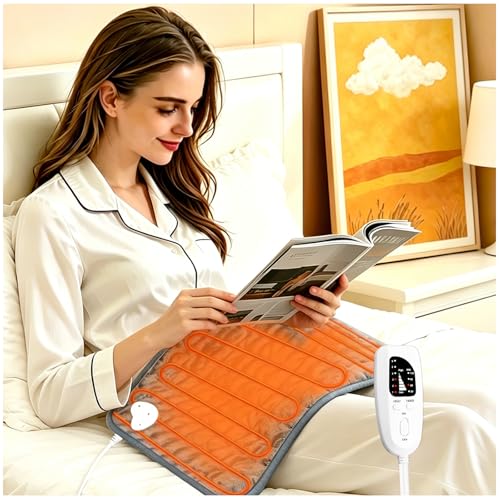
VIBOOS
Electric Heating pad with 6 Heat Settings,…
- Electric heating pad, perfect for for back, neck and shoulder, knee, abdomen, legs, arms, etc
- The heating pad has 6 temperature levels and 4 timer functions. The temp range is from 104°F to 140°F(40°C to 60°C). The timer can…
- Premium flannel, super soft material and better insulation effects. Disconnect the cable connection and hand washing or machine wa…
If you use a local heating device like the VIBOOS Electric Heating Pad (with 6 heat levels, automatic shut-off timers, and a soft flannel cover), you control it directly at the pad — no remote range issues there. But for heating systems where you need to operate from another room or floor, signal range matters. Let’s fix that.
First, Know What You’re Working With
Remote heating controls fall into a few major categories. The fix for each is different, so start by identifying yours.
- Radio frequency (RF) remotes operate on a specific frequency, usually 315 MHz or 433 MHz. These are common in standalone space heaters and garage heaters. Range is typically 50 to 100 feet in open air, but drops fast through walls.
- Wi-Fi controls connect through your home network. They rely on your router’s signal strength. If the heater is far from the router, your phone app won’t connect reliably.
- Z-Wave or Zigbee protocols use mesh networking. Each device can repeat the signal to the next, extending range gradually. But you need a hub and compatible devices.
Check your manual or look up the model number online. If it says something like ‘433 MHz remote,’ you’re in the RF camp. If it mentions a ‘smart hub’ or ‘app control,’ it’s likely Wi-Fi or mesh protocol. Understanding this first step saves you from buying the wrong gear. For a deeper look at how these systems work, see this primer on remote heating control systems.
The Real Killers: Walls, Distance, and Interference
Radio signals behave a lot like sound. Thick concrete blocks muffles them. Metal ductwork reflects them. Even a dense bookshelf can weaken a signal by 30% or more. Here are the hard numbers you need to know.
- Wood frame + drywall: Reduces RF range by roughly 20–30% per wall.
- Concrete or brick: Cuts range by 50–70% per wall. Two concrete walls often kill the signal entirely.
- Metal appliances or ducts: Act like a shield. A water heater or furnace between you and the receiver can drop signal to zero.
- Distance: In open air, a typical RF remote works at 50–100 feet. Indoors with two wood walls, you get maybe 20–30 feet.
Wi-Fi range also gets hammered by these obstructions, but Wi-Fi operates at 2.4 GHz, which penetrates slightly better than 433 MHz through some materials but worse through others. Z-Wave (908 MHz in the US) penetrates walls better than Wi-Fi but has slower data speeds.
Before buying any booster, test your issue. Walk toward the heater with the remote until it works. Note the distance and what’s between you. That tells you exactly how much reach you need to add.
Practical Ways to Extend Range
Now let’s talk solutions. I’ve tried all of these, and each has a place. There’s no single best answer — it depends on your system type and setup.
1. Add a Signal Repeater
For RF systems, a plug-in repeater listens for the remote’s signal and rebroadcasts it. These cost $20–$50. Place it halfway between the remote and the heater. A simple good remote control for heating might already support pairing with a repeater — check the manual.
Drawback: repeaters only work with the same frequency and protocol. You can’t use a generic repeater for a proprietary system. Also, they add a tiny delay (maybe 50–100 milliseconds), usually unnoticeable.
2. Upgrade the Antenna on the Receiver
Many RF heating controls have a small internal antenna inside the receiver box. You can often replace it with an external antenna mounted higher up or in a better spot. A quarter-wave whip antenna can triple range. This takes some soldering skill or a plug-and-play adapter if available.
Trade-off: you void the warranty. And if the antenna port is non-standard, you’ll need adapters. Worth it if you’re handy.
3. Switch to a Mesh-Protocol System (Z-Wave/Zigbee)
If you already have a smart home hub (like Hubitat, SmartThings, or Home Assistant), consider replacing the receiver with a Z-Wave compatible one. Every Z-Wave device that’s plugged into mains power acts as a repeater. So a smart plug in the same room as the heater can relay the signal from your remote. Range effectively becomes the whole house if you have enough devices.
Downside: cost and complexity. You need a hub, compatible switches, and some setup time. But it’s the most scalable solution.
4. Use a Wi-Fi Bridge or Powerline Adapter
For Wi-Fi controls that can’t reach the router, a Wi-Fi range extender placed near the heater works — but only if the heater’s own Wi-Fi module can talk to the extender. Some cheap space heaters have weak Wi-Fi radios that don’t handle extended networks well. A better approach: use a powerline adapter (Ethernet over your home’s electrical wiring) to connect the heater’s receiver to your router via a wired connection. That bypasses Wi-Fi entirely.
Powerline performance depends on your home’s wiring. Older homes with aluminum wiring or circuits on different phases may get poor speeds (under 10 Mbps), but that’s still enough for a simple on/off command.
Comparison Table: Range Extension Methods
| Method | Best For | Typical Range Gain | Cost | Difficulty |
|---|---|---|---|---|
| RF signal repeater | RF remotes (315/433 MHz) | Adds 30–100 feet | $20–50 | Easy (plug in) |
| External antenna upgrade | RF receivers with antenna port | 2x–3x original | $10–30 | Moderate (soldering may be needed) |
| Z-Wave/Zigbee hub + switches | Any heating system with compatible relay | Covers whole house (mesh) | $100–300 | High (setup time) |
| Wi-Fi extender | Wi-Fi connected heaters | Varies; often 50–100 feet | $25–60 | Easy |
| Powerline Ethernet adapter | Wi-Fi heaters with Ethernet port | Reliable connection anywhere on wiring | $40–80 | Easy |
I lean toward the RF repeater or external antenna for simple, cheap fixes. For someone rebuilding a whole home control system, the mesh route pays off long term. Avoid the Wi-Fi extender unless you have no other option — it adds another point of failure.
If you want to integrate your existing heater into a smart system, the Z-Wave route is the cleanest modern approach. Just be ready for a weekend project.
Real Questions People Ask About Heating Control Range
Can I extend the range of my RF remote with a simple antenna?
Sometimes yes. If your remote has a removable antenna (screw-on connector), you can replace it with a longer one tuned to the same frequency. A 1/4-wave antenna for 433 MHz is about 6.5 inches. That alone can double range in open air. If the antenna is internal and sealed, it’s harder — you’d need to open the remote and solder. That voids the warranty and risks damaging the device. In that case, a repeater is safer.
Will a Wi-Fi range extender work for my heating control?
It can, but don’t expect miracles. Many Wi-Fi heaters use low-power chips that struggle to stay connected to a distant extender. Also, the extender itself cuts bandwidth in half because it has to retransmit on the same channel. For a simple on/off command, bandwidth doesn’t matter, but latency might increase. I’ve seen cases where the app shows ‘offline’ even though the extender shows a strong signal. Test the extender within return policy before committing.
How far can Z-Wave signals go through walls?
Z-Wave has a clear line-of-sight range of about 100 feet. Through one wood wall, figure 50 feet. Through two, maybe 25. But the mesh feature changes everything — if you have a Z-Wave smart plug in the hallway, it repeats the signal to the next room, and so on. With three or four mains-powered devices spread through the house, you can cover most single-family homes regardless of wall count. Just remember battery-powered Z-Wave devices (like some sensors) don’t repeat, so they don’t help range.
Do I need to replace my entire heating system to get better range?
Almost never. The control side — remote, receiver, relay — can be swapped without touching the heater itself. Many space heaters have a simple relay that accepts a remote signal. You can replace that receiver with a more capable one (like a Z-Wave dry contact relay) that wires into the same terminals. The heating element, fan, and safety thermostats stay unchanged. Check the heater’s wiring diagram first. If it’s a modern unit with a proprietary digital controller, you might be stuck. But basic resistive heaters are easy to retrofit.
Is it safe to use a signal booster for a heating control?
Yes, if you buy a reputable brand and follow the manual. Signal boosters for RF remotes are passive or low-power and don’t interfere with other devices. Avoid cheap no-name repeaters from unverified sellers — they might not filter noise properly and could cause erratic behavior. One real risk: if a booster accidentally amplifies interference, the heater might receive a false on signal. That’s rare, but to be safe, choose a booster from the same brand as your remote or a well-known accessory maker. Test the setup in a controlled way before leaving the heater unattended.
What to remember when extending your heating control range
- Identify your control type first — RF, Wi-Fi, or mesh protocol. The solution depends on it.
- Obstructions matter more than distance. A thick concrete wall can block a signal that would otherwise travel 100 feet.
- For RF remotes, a dedicated signal repeater is the cheapest and easiest fix. Place it about halfway between the remote and the heater.
- If you’re handy, upgrading the receiver’s antenna can triple range without adding extra hardware.
- For whole-home coverage, invest in a Z-Wave hub and mains-powered switches. The mesh network grows stronger with each device.
- Wi-Fi extenders work but test first — many low-cost heaters have weak Wi-Fi radios that hate extenders.
- Never assume you need a new heater. Most range problems are fixable with a $30 part and an hour of your time.

I am a mechanical engineer and love doing research on different home and outdoor heating options. When I am not working, I love spending time with my family and friends. I also enjoy blogging about my findings and helping others to find the best heating options for their needs.
Related guides

Smart Heating Systems That Work With Remote Control
Many heating systems, including smart thermostats, electric heaters, and some gas furnaces, are compatible with remote control for…

Smart Ways to Save Energy With Remote Heating Control
You walk in the door after a long day. The house is freezing. You crank the thermostat to…
Remote Heating Control: Smart Solutions for Modern Homes
You come home from a trip, walk through the door, and the house feels like a refrigerator. You…